
Post-call days and comp days
A post-call day is the day after an overnight call shift, when the physician is kept off the schedule to recover. Some practices also give a comp day, a different day off in return for a particular shift, such as Monday off after Friday call. In Orchestrate Health both are set on the role: generation keeps those physicians off, and the calendar shows who is out.
- Keep physicians off the schedule the day after call.
- Give Friday’s call physician Monday off instead of Saturday.
- See who is post-call on any day.
How to do it
- 1
Open the role
Open Coverage & Roles in the Setup section of the sidebar, or press R, and select the pencil on the role, such as Call, or Add role for a new one. Post-call settings belong to each role, so a role without them never earns a day off.
- 2
Turn on the post-call day
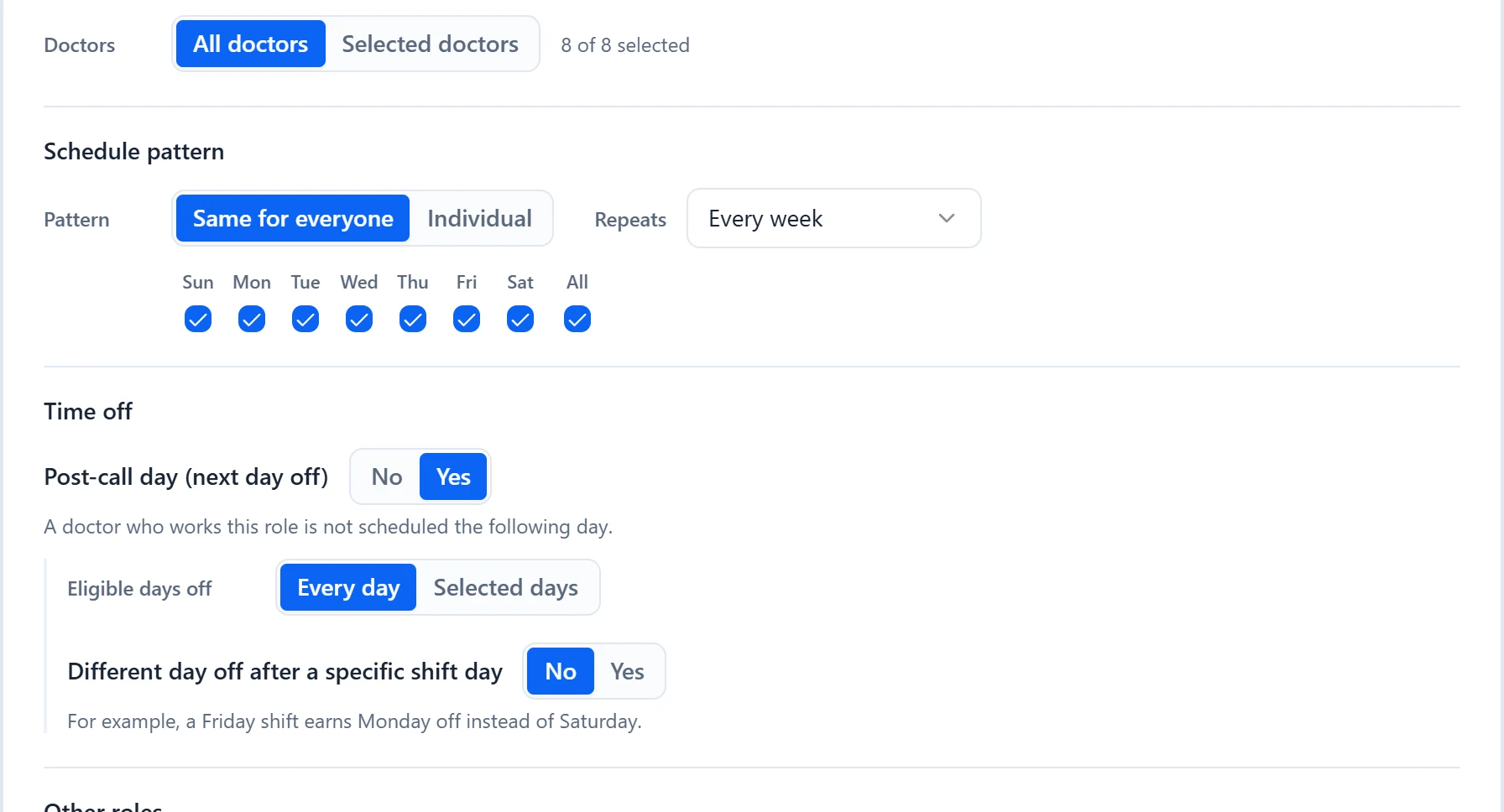
Under Time off, set “Post-call day (next day off)” to Yes. As the form says, a doctor who works this role is not scheduled the following day.
- 3
Choose the eligible days off
“Eligible days off” is “Every day” unless you choose “Selected days” and tick boxes. The boxes are the days off, not the shift days: a Friday shift earns Saturday off only if Saturday is checked.
- 4
Add a comp day if you give one
Set “Different day off after a specific shift day” to Yes. Tick the days under “After a shift on”, then set “the day off is” to “the same day for everyone” with a weekday, or “different per doctor” to pick a day for each physician in the role.
- 5
Save the role
Select Save in the role form. The role’s row in Coverage & Roles now lists its rules, such as “post-call day off” and “Fri shift gives a Mon comp day”.
- 6
Check the calendar
Open a day to see post-call physicians under “Unavailable:” as “Post-call day off”. In Display Options, turn on “Show Out-of-Office (OOO) physicians” to add an OOO line to every day, where post-call physicians carry “(Post-call)” after their name.
Examples
Call runs every day with “Post-call day (next day off)” set to Yes and “Eligible days off” at “Every day”. Dr. Adams takes Call on Wednesday 3/11, so generation leaves Adams off every role on Thursday 3/12. The day editor for 3/12 lists Adams under “Post-call day off”, and the OOO line reads “Adams (Post-call)”.
Your practice gives Friday’s call physician Monday off rather than Saturday. On the Call role, set “Eligible days off” to “Selected days” and tick Monday through Friday only, then set “Different day off after a specific shift day” to Yes, after a shift on Friday, with the day off Monday for everyone. Dr. Brooks takes Call on Friday 3/13, can still be scheduled on Saturday 3/14, and is kept off Monday 3/16.
Good to know
- The day off is a whole calendar day, and it blocks every role that day, not only the role that earned it.
- A comp day adds to the post-call day rather than replacing it. To make Monday replace Saturday, leave Saturday unchecked under “Eligible days off”, as in the second example.
- The comp-day setting only appears while “Post-call day (next day off)” is Yes.
- The comp day also shows the physician as unavailable in the day editor, and as “(Post-call)” on the OOO line.
- When a pattern in Patterns & Preferences gives one physician a run of days in a row, such as a whole weekend, the days inside that run are not treated as post-call days.
- You can still assign a post-call physician by hand. The day editor lists the clash under “Assignment conflicts”, and the calendar marks it with a red triangle.
- Post-call days and comp days are not absences. They do not appear in Absences and do not change anyone’s Target in Shift Count.
- There is no per-physician exception to the post-call day. It applies to everyone who works the role; only the comp day can differ by physician.
See the product tourRead the FAQ