Fair physician call schedules in minutes, without the stress
Enter PTO, coverage rules, roles, and fairness preferences. Orchestrate Health generates balanced call schedules your team can adjust, explain, and sync to personal calendars.
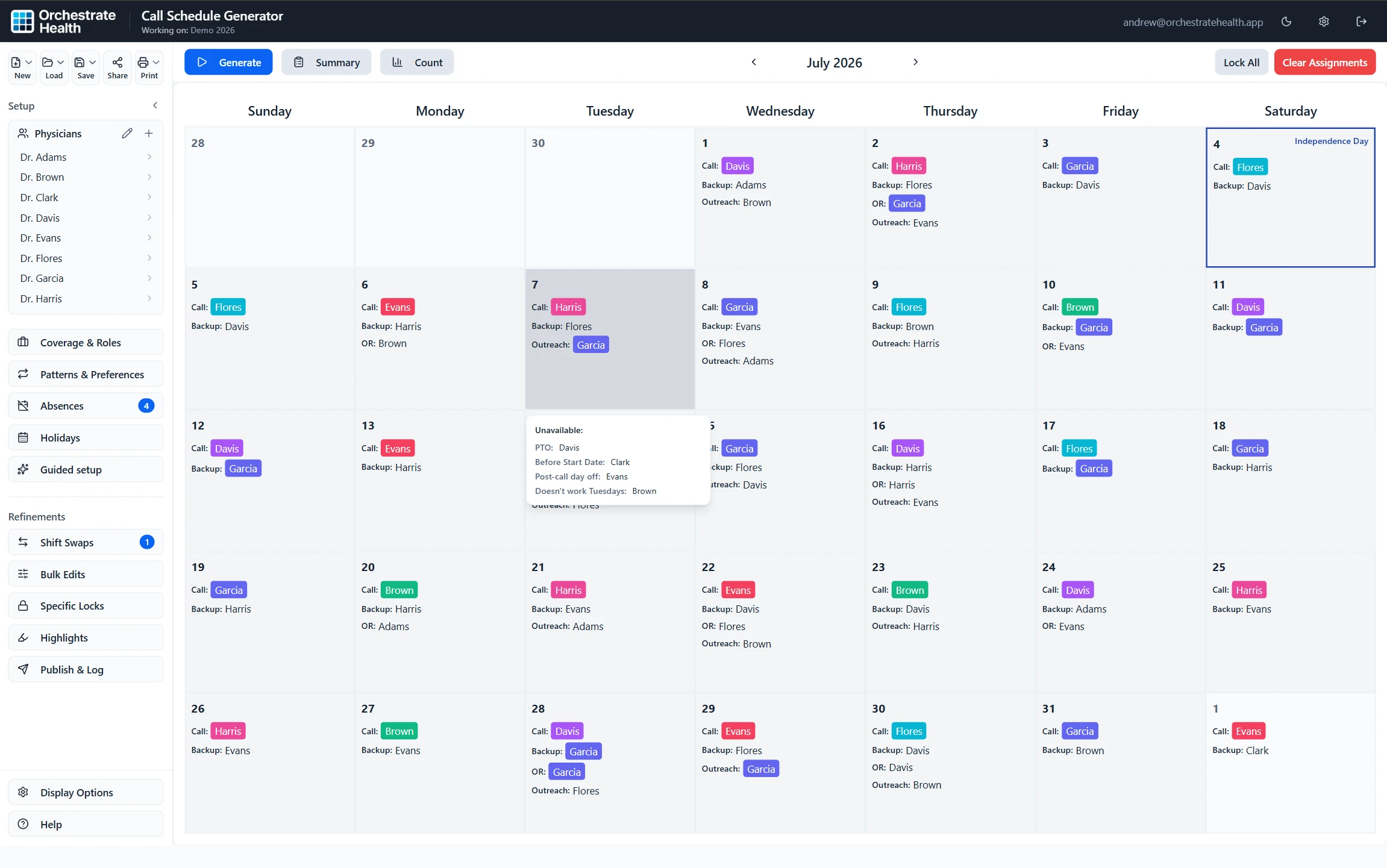
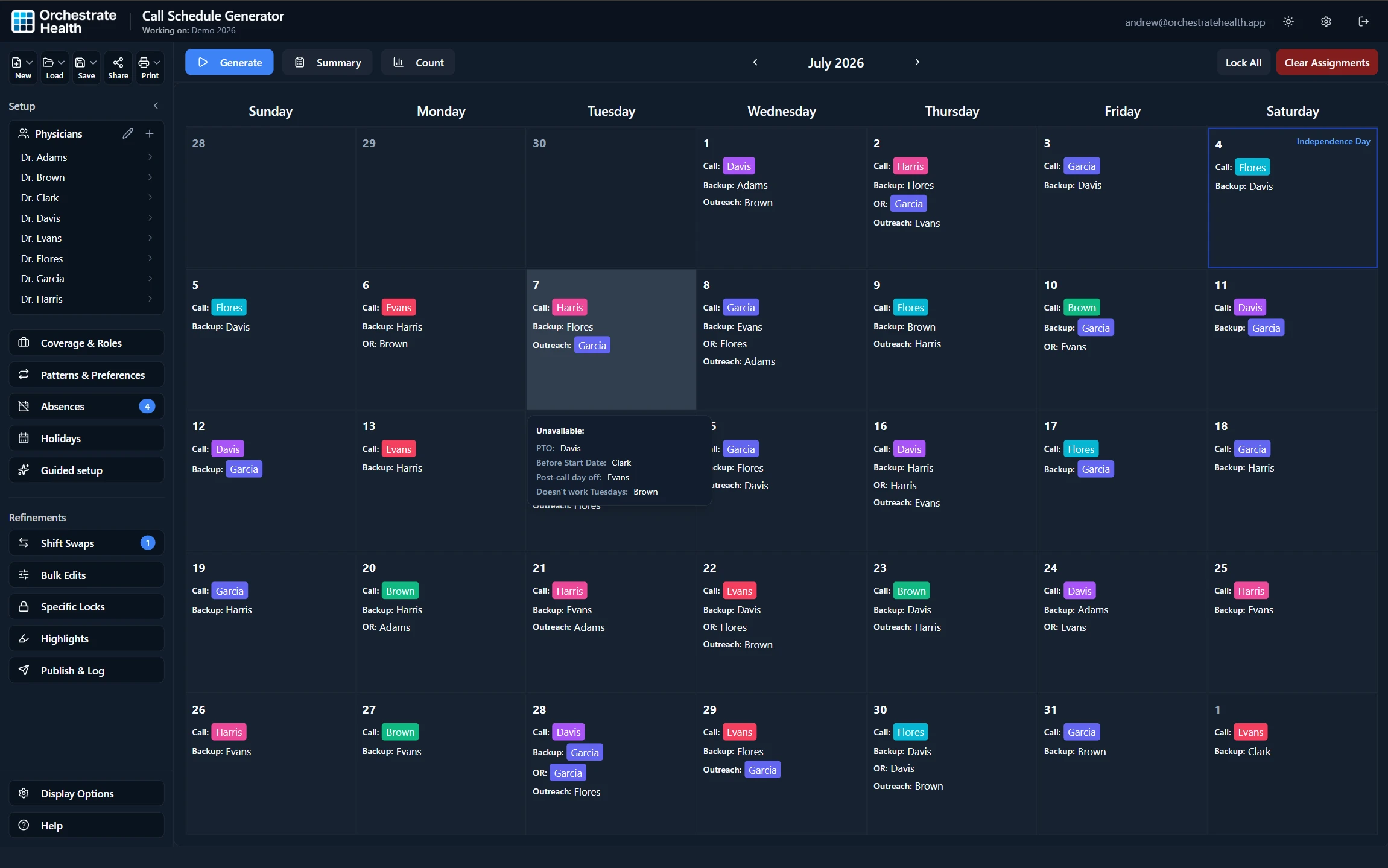
Hover or open any day to see who is unavailable and why: PTO, not yet started, a post-call day off, or a weekday they don’t work.

“Making the call schedule used to take hours of work away from my family to make sure it was fair and avoid conflicts. Since using Orchestrate Health, I can generate a schedule almost instantly, review call and OR counts, and confidently make adjustments knowing conflicts would be flagged instantly.”
Jordan Gray, MD
Board-certified OB/GYN · Scheduler for an 8-physician call group · Austin area
Problem
The schedule is never just a calendar
Complex interactions between roles, availability, and fairness create hours of manual work.
Human error
PTO requests, clinic conflicts, and coverage rules are easy to miss when they live across emails, texts, spreadsheets, and memory.
Fairness concerns
Schedulers work too hard to worry about perceived favoritism. Manually balancing call, backup, weekends, and custom roles takes time.
Disruptive changes
New physicians, departures, and unexpected leaves can force painful rebuilds.
Solution
How Orchestrate Health works
Configure your clinic once, collect the inputs for each schedule, generate a balanced call schedule, then keep it current as real life changes.
Configure your clinic
Define your physicians, roles, coverage rules, fairness preferences, and how your group actually works.
Collect schedule inputs
Set the schedule range, update active physicians, and let doctors submit PTO requests and shift swaps.
Generate the schedule
Generate a call schedule using your constraints and distributes shifts across physicians based on availability, role participation, and FTE weighting.
Manage changes
Keep the live schedule accessible, sync assignments to calendars, track changes, and quickly rebuild dates or refill shifts when plans change.
Flexible rules
Built for the exceptions every group has
Most call schedules are not hard because of the calendar. They are hard because every group has exceptions.
Add a start date and include the physician only when they become available.
Set the unavailable window, preserve approved assignments, and regenerate around the change.
Adjust scheduling weight so assignment counts reflect workload and FTE.
Add physician-specific rules for weekdays, weekends, clinic days, blocked days, or preferred coverage patterns.
Lock known coverage days, such as locums shifts or pre-approved assignments, and generate the rest of the schedule around them.
Account for recurring rules such as specific weekdays, monthly patterns, or known coverage preferences.
Schedule backup call alongside primary call with separate rules, counts, and coverage requirements.
Support call, backup, OR, clinic, location-specific coverage, and custom roles.
How Orchestrate Health compares
Spreadsheets are free but fragile. Enterprise platforms are powerful but heavy. Orchestrate Health is built for practices that want scheduling to just work.
Founder-supported setup
See how Orchestrate Health handles your next schedule
Early practices get hands-on setup support. We'll help translate your real rules, roles, PTO patterns, and fairness preferences into Orchestrate Health so you can generate, adjust, and share your first schedule with confidence.