
Limit which days and roles a physician works
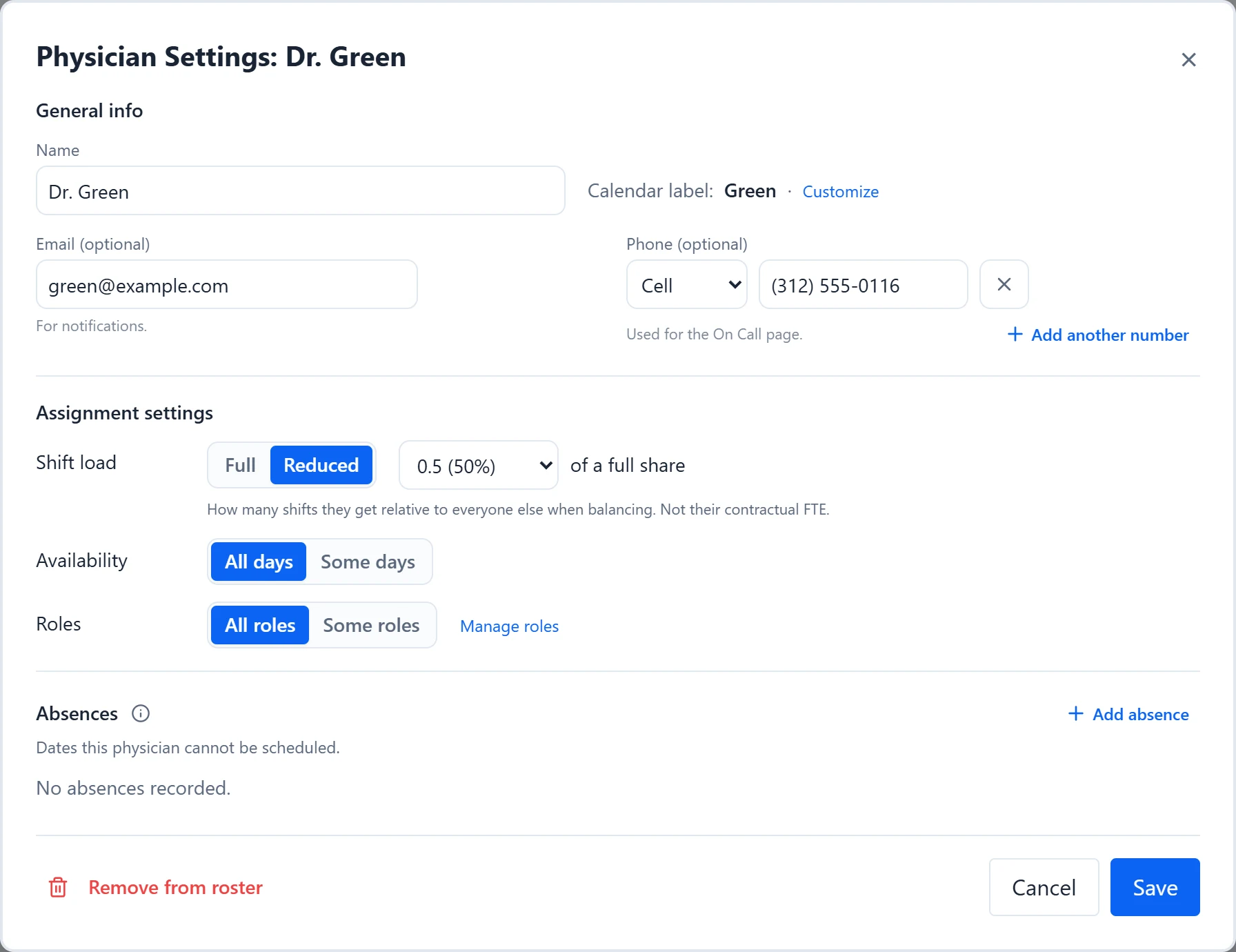
Many practices have physicians who only take call on certain weekdays, or who cover some roles but not others, such as a physician who takes Call but never OR. In Orchestrate Health these are eligibility settings: which weekdays a physician is available, which roles they can fill, and, for each role, which doctors work it and on which days. Generation only places a physician where all of them allow.
- Keep a physician off a weekday every week.
- Limit a role to certain physicians.
- Set up a role where each physician works their own set days.
How to do it
- 1
Limit weekdays for a physician
Click the physician’s name in the sidebar to open Physician Settings. Under “Availability”, choose “Some days” and turn off the weekdays they never work. This applies to every role.
- 2
Limit roles for a physician
In the same dialog, under “Roles”, choose “Some roles” and tick the roles they can fill. “All roles” puts them back in every role.
- 3
Or choose doctors from the role side
In Coverage & Roles, select the pencil on a role. Under “Doctors”, choose “Selected doctors” and tick names in the Roster list. This is the same setting as “Roles” in Physician Settings, seen from the role.
- 4
Give each doctor their own days in a role
In the role form, under “Schedule pattern”, set “Pattern” to “Individual”. Each selected doctor gets their own row of days, and the “All” row ticks a day for everyone at once. Select Save.
- 5
Check a day
Open a day on the calendar. “Unavailable:” lists who cannot work it and why, such as “Doesn’t work Mondays” or “Not in role pool”. Names in amber under “Available:” can work some roles that day but not others.
Examples
Dr. Rivera never works Mondays and does not do OR. In Physician Settings, set “Availability” to “Some days” with Monday off, and set “Roles” to “Some roles” with Call and Backup ticked. Rivera is never scheduled on a Monday in any role and has no row in the OR section of Shift Count, because OR’s shifts are shared only among the physicians who work it.
OR runs Monday to Thursday, and each surgeon has a fixed day. Set OR’s Pattern to “Individual” and tick Monday for Dr. Chen, Tuesday for Dr. Adams, and Wednesday and Thursday for Dr. Brooks. OR runs on any day at least one selected doctor has ticked, and only that doctor is eligible for it.
Good to know
- Weekday availability is all or nothing for that day. To keep someone off one role on a weekday but allow others, use an “Individual” pattern on that role instead.
- Availability and Individual days do not lower a physician’s Target or Share in Shift Count. If a physician who works fewer weekdays should also do less call overall, lower their “Shift load”.
- There is no rule that keeps two named physicians apart or together, such as “never on the same day as Dr. X”. Check the calendar after generating and change those days by hand.
- There is no “avoid” preference. Availability, Roles, and absences are firm limits. For one-off dates, such as a conference, add an absence.
- The day editor still lets you assign anyone, even someone marked unavailable. Its “Assignment conflicts” list is how you catch a manual exception.
- A role switched off in Coverage & Roles still shows under “Some roles”, marked “(disabled)”.
See the product tourRead the FAQ